The complete launcher for Linux.
Waycast is tailored specifically for linux and wayland, focused on what matters as opposed to trying to add everything. It's specifically designed to work properly in layershell environments like hyprland without any additional configuration.
Written in Rust(btw).
Features
What we added and what's coming soon.
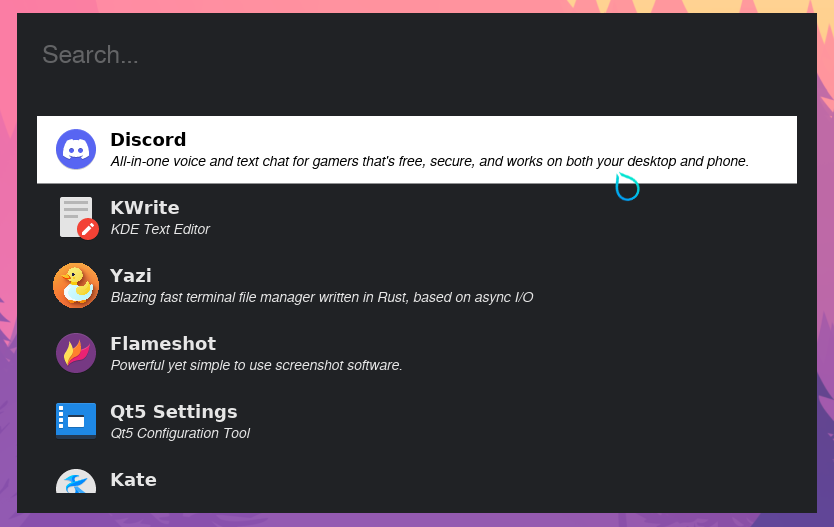
Launch Applications
Open code projects
Open files
Calculator
Emoji Picker
Clipboard history
The why
What Waycast brings to the table
When I started using hyprland, I saw that most launchers were either too much or too little. They either had no features, or required reading a manual to set them up correctly. Plugin systems, gtk css, custom hyprland window rules so they would float properly. I didn’t want any of it.
A lot of them also didn’t properly follow freedesktop standards which made them not detect all the installed applications. This came up a lot on my NixOS setup.
I wanted a launcher that looked nice from the start, was easy to set up, and had the features I wanted ready to go. So I built waycast.
Built in features
Application Launching
Normal and expected launcher behavior, powered by my freedesktop crate.
Code Project Launching
You can configure directories containing code projects and they’ll be searchable from waycast. Configure the open_command to open them
in your favorite editor.
Additionally, code projects will have language specific icons in your launcher thanks to devicon.
File Search
Open any file in the configured search directories straight from waycast. Files will open using your default app for that file type.
Calculator
Calculator with unit conversions powered by mathengine right in your launcher.
Though I’m not opposed to adding a plugin system later, I want waycast to have most features built into the core, so that it can stay a single, easily installed binary.
Window manager convenience
Waycast is integrated with layershell, meaning that it will show up in the middle of the screen and above other windows reliably, without any extra window manager configuration.
Additionally, most people that use tiling window managers have custom keybindings, so waycast
has convenient commands such as waycast show that you can assign to them.